
Jellyfin
Overview
Jellyfin serves as our central home media hub, providing a streamlined and private way to access our entire digital collection from any device. This library hosts a wide array of content, including high-definition Movies, complete TV Show series with automatic progress tracking, and a dedicated archive for our Home Videos. Additionally, it integrates Live TV and an interactive program guide for real-time broadcasts. By hosting this service ourselves, we maintain full control over our data with no subscription fees or tracking, ensuring a seamless viewing experience for the whole family whether using a mobile app, a web browser, or a smart TV.
Setting Up Jellyfin
Setup on Phone
Open the app on your mobile device and enter the servers domain address to reach the site. Apps are available for both Iphone and Android users. Use the domain provided in your email for setup of the device. The domain can be found by accessing your personal dashboard provided in your setup email. Alternatively, the service status dashboard will allow you to click each app and be directed to the site in your web browser.
It is Strongly recommended that you start by signing into your Iphone as it will make signing into your other devices much easier.
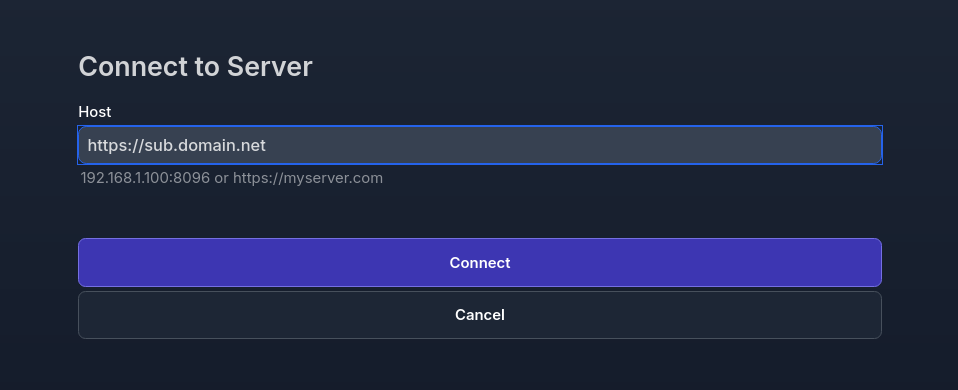
Once the server address has been entered, enter your username and password as indicated in the email sent.
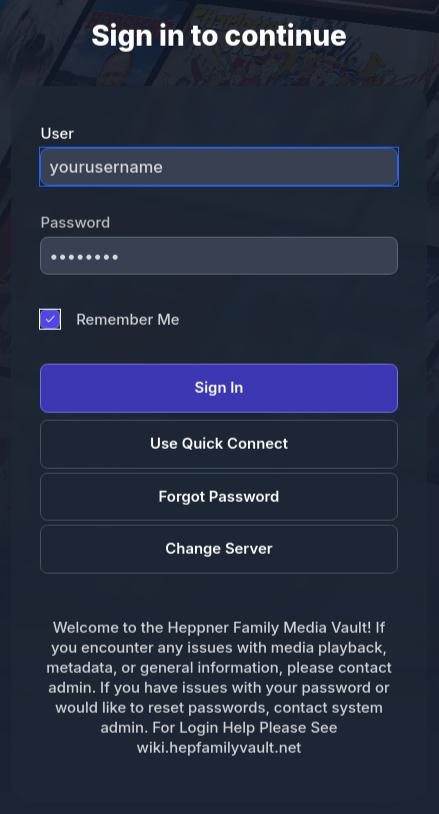
Once you have logged in properly, you should be able to see Movies & TV Shows. (LIVE TV IN THE NEAR FUTURE FOR LOCAL STATIONS)
Setup on Computer
There are Jellyfin apps that can be downloaded to your personal Desktop Computer or Laptop. This is the recommended way of watching Movies or TV on your computer. Alternatively, you can access the site via your internet browser by typing in the domain address that was sent in an email to you.
No comments to display
No comments to display